
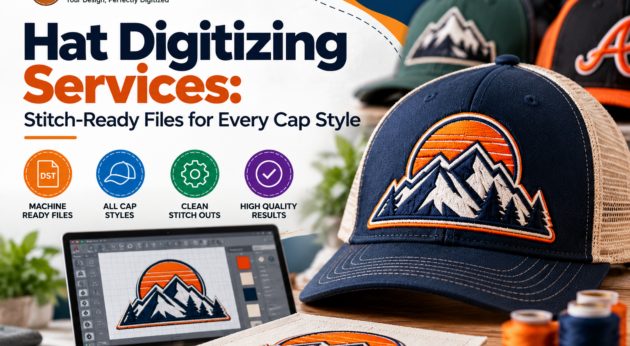
Every cap order depends on one file, and that file decides whether your logo looks crisp or crooked. Before production starts, we recommend working with Custom hat digitizing services that set stitch direction, density, and underlay for the exact cap you plan to decorate.
At ZDigitizing, we prepare embroidery files for structured caps, trucker hats, dad hats, and beanies. This guide covers how Hat digitizing services turn artwork into stitches, which cap styles need special attention, and what to check before your file goes to the machine.
Hat digitizing services turn a logo, text, or graphic into a machine embroidery file. The file stores stitch types, stitch angles, density, underlay, trims, and color changes. The machine follows those instructions step by step.
Cap digitizing differs from standard garment digitizing because headwear has a curved front, a center seam, and a firm or soft crown depending on the style. Each of those traits changes how the file should be built.
Not every hat behaves the same under the needle. Here is how common styles affect the digitizing approach:
These caps have a firm buckram backing in the front panel. The stiff base supports solid fills and clean satin edges, but heavy density can make the panel rigid or cause thread breaks.
Soft crowns move more during stitching. We typically plan lighter density and stronger underlay so the design does not pucker or sink into the fabric.
The mesh back is not for embroidery, but the foam front panel can be tricky. Fine details can get lost in the foam texture, so simple shapes and clear outlines perform best.
Knit fabric stretches and has visible texture. Bold designs with clear stitch coverage work better than thin lines, which can disappear between the loops.
Matching the file to the cap type is the core of custom hat digitizing services. A single logo may need slightly different settings for each style.
Here is how the process works in our workflow:
Clean artwork leads to cleaner stitching. You can help by sending:
If your image is blurry or has jagged edges, our Vector Art Service can redraw it into clean shapes before digitizing starts. Starting with solid artwork gives our custom hat digitizing services a better base to work from.
Machines read different formats, so confirm yours before ordering:
If you are unsure, check your machine’s manual or software. Providing the correct format at the start keeps your project moving without conversion problems.
A short review can prevent wasted caps. Before stitching, check these points:
A test stitch is a practical way to confirm the file before running a full batch.
Many cap defects start in the file, not on the machine. Well-prepared hat digitizing services help reduce:
Some caps need extra dimension. Our 3D Puff Embroidery Digitizing creates a raised, bold effect that suits block letters and simple logos, and our Applique digitizing service builds designs with fabric layers. If you plan to add a patch-style look, our Patch Digitizing service is another option. Each effect requires its own file setup, so please tell us the look you want from the start.
A good cap file saves thread, time, and caps. If you have a logo ready, ZDigitizing can prepare it for your hat style, fabric, and machine. Share your artwork and placement details, and we will help you get a production-ready file.
For related headwear work, our Cap Logo Digitizing service is also available, and choosing professional hat digitizing services helps your design stitch the way you pictured it.
Hat digitizing services convert your artwork into a stitch file made for cap embroidery. We set stitch types, density, underlay, and sequence for the curved crown and seam, then deliver the file in your machine’s format.
Yes. Structured caps, unstructured hats, trucker hats, and beanies each react differently to stitching. We adjust density, underlay, and stitch direction based on the cap style so the design stays clean and balanced.
A vector file works best, but a clear, high-resolution image also works. Include the cap style, design size, placement, and machine format. We can help rebuild low-quality artwork before digitizing.
We can prepare common formats such as DST, PES, EXP, and JEF. Tell us which machine you use, and we will provide the compatible file so you can load the design without conversion issues.
Yes. We offer 3D puff embroidery digitizing and appliqué digitizing for caps. These effects need specialized file setups, so let us know which one you want when you send your artwork.
October 12, 2026 - October 21, 2026
05:30 AM
Hat digitizing services prepare logos for caps, trucker hats, and beanies. Learn what we need from you, how stitch settings work, and which formats to request.
10
January 11, 2000
Virtual
#HatDigitizingServices:Stitch-ReadyF...


Kompster is a directory and marketplace for competitions, races, challenges & championships.
We're building the World's Largest Repository of Competitions, right here on the web. Join us!
Browse Competitions or List an EventKompster.com - The World of Competition